Free Music Patterns for Download
Looking for music patterns? Here are a few music patterns to download for free:
The demos above are short examples of what you can do with Prosonic Patterns.
Each demo starts with the pattern, then builds up to show how it could be used.
The recorded sounds and some of the patterns used in the build-up may not be included in this midi library.
There are over 17,900 midi patterns in this library and they all sound as good as, or better than, the demos.
More Information
You just found THE ULTIMATE MUSIC PATTERN LIBRARY.
This isn't like one of those old paper books . . . It's a full-blown MIDI library that's over-flowing with thousands of professional patterns!
You'd have to purchase hundreds of "pattern dictionary" books to even come close to the content in this library, and since they're all in MIDI, you can hear the Pattern instantly with any MIDI instrument you have. No paper book could ever do that.
This collection is like having a WHOLE LIBRARY of "pattern dictionaries" and you can use the Patterns in your own music royalty-free.
I've experienced instant inspiration and song writing has never been easier. Each MIDI Pattern is like a "creative launch-pad" for your ideas and the 'next part' in the song just leaps out at you! Begging you to take it to the next section!
If you perform an instrument these patterns are an invaluable tool for learning patterns. I play guitar and these have instantly made me a better player.
There are over 17,900 diatonic and non-diatonic patterns in this library [and they all sound as good as the demos] so get ready for a lifetime of new ideas!
File Info & Folder Layout
1. ROOT:
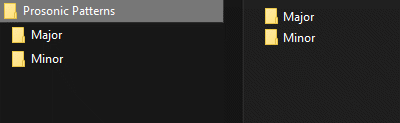
The first folder is the ROOT folder. It contains all of the MIDI Patterns. It is named "Prosonic Patterns" and is selected (highlighted).
2. TONIC QUALITY:
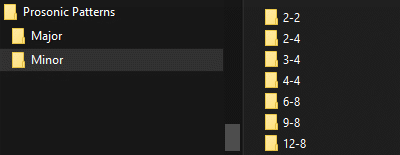
The ROOT folder contains the TONIC QUALITY folders. In this case Major and Minor (both have tonic of C). Patterns in Major Key are found in the Major folder and patterns in Minor Key are found in the Minor folder. We currently have the Minor folder selected.
3. TIME SIGNATURE:
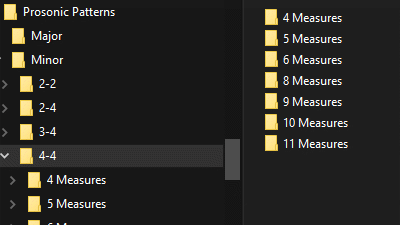
Each TONIC QUALITY folder contains TIME SIGNATURE folders. We currently have the 4/4 folder selected.
4. MEASURE COUNT:
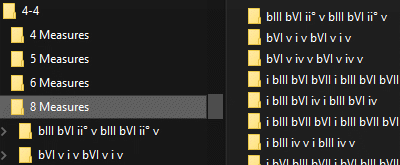
Each TIME SIGNATURE folder contains MEASURE COUNT folders. These indicate how many measures are in the contained patterns.
We currently have the 8 Measures folder selected.
5. HARMONIC PROGRESSION:
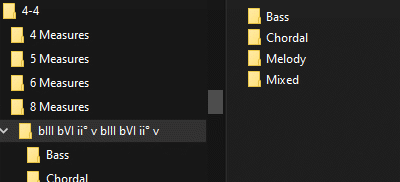
Each MEASURE COUNT folder contains HARMONIC PROGRESSION folders. Each folder is named according to what progression it contains.
6. PATTERN TYPE:
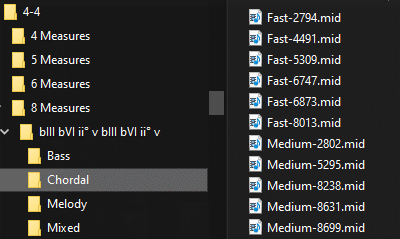
Each HARMONIC PROGRESSION folder contains the PATTERN TYPE folders. Bass contains bass patterns, Chordal contains patterns
that contain mostly chords, Melody contains melodic patterns, and Mixed contain patterns that have a mixture of the previous types.
7. THE FILE:
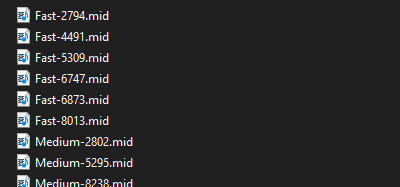
Finally we are at the actual MIDI files. The file name gives an indication of what speed the pattern would sound best at and the number
(after the "-") is just a unique id.
Midi Patterns FAQ
What is a MIDI File?
While the word "MIDI" is used to describe a few different things. A "MIDI file" can be thought of as "Sheet Music in Digital". (Sheet music that computers can read and play.)
Why use MIDI loops instead of audio loops?
MIDI is a superior method of music composition for a number of reasons.
If you've ever used audio loops to write music you know how frustrating it can be to get them to fit just right in your song. You might find a great drum loop but how can you develop it while keeping the same drum sounds? You can only make variations on the timbre of the sound itself and that's it.
With MIDI loops you have total control over every aspect of each note. Need to bring the hi-hats up in the mix? Easy! Need to change that note and make it sweeter? Just move it where you want it! Don't like a note... delete it!
You can also use a MIDI loop on any instrument. So you can use a drum loop on any instrument (flute or violin for example) and come up with very unique and creative musical ideas!
You can even change the tempo of a MIDI loop and the sound of the drums will be exactly as you sampled it.
What's a "MIDI Pattern"?
We use the term "MIDI Pattern" to mean: a four-bar musical Pattern (in MIDI) that is crafted to follow correct harmonic and voice leading rules.
What software can I use MIDI Patterns in?
Every MIDI Pattern is compatible with, and can be loaded into, any MIDI compatible software or hardware device (ie: your favorite sequencer).
Loading them into Propellerhead's Reason™ and Twelve Tone's Sonar™ has been especially rewarding. They are perfect for Cakewalk Project5, Battery 3, Cubase, Garageband, Pro Tools, Motif ES, Fruity Loops, EZdrummer, DFH, Sony's ACID® Pro, Ableton Live, and many more!
Prosonic Studios is a TAX-FREE website?
**We pay local taxes for you. We do not collect VAT tax, or any other taxes that you are responsible for paying, the taxes mandated by the laws in your country or place of residence.